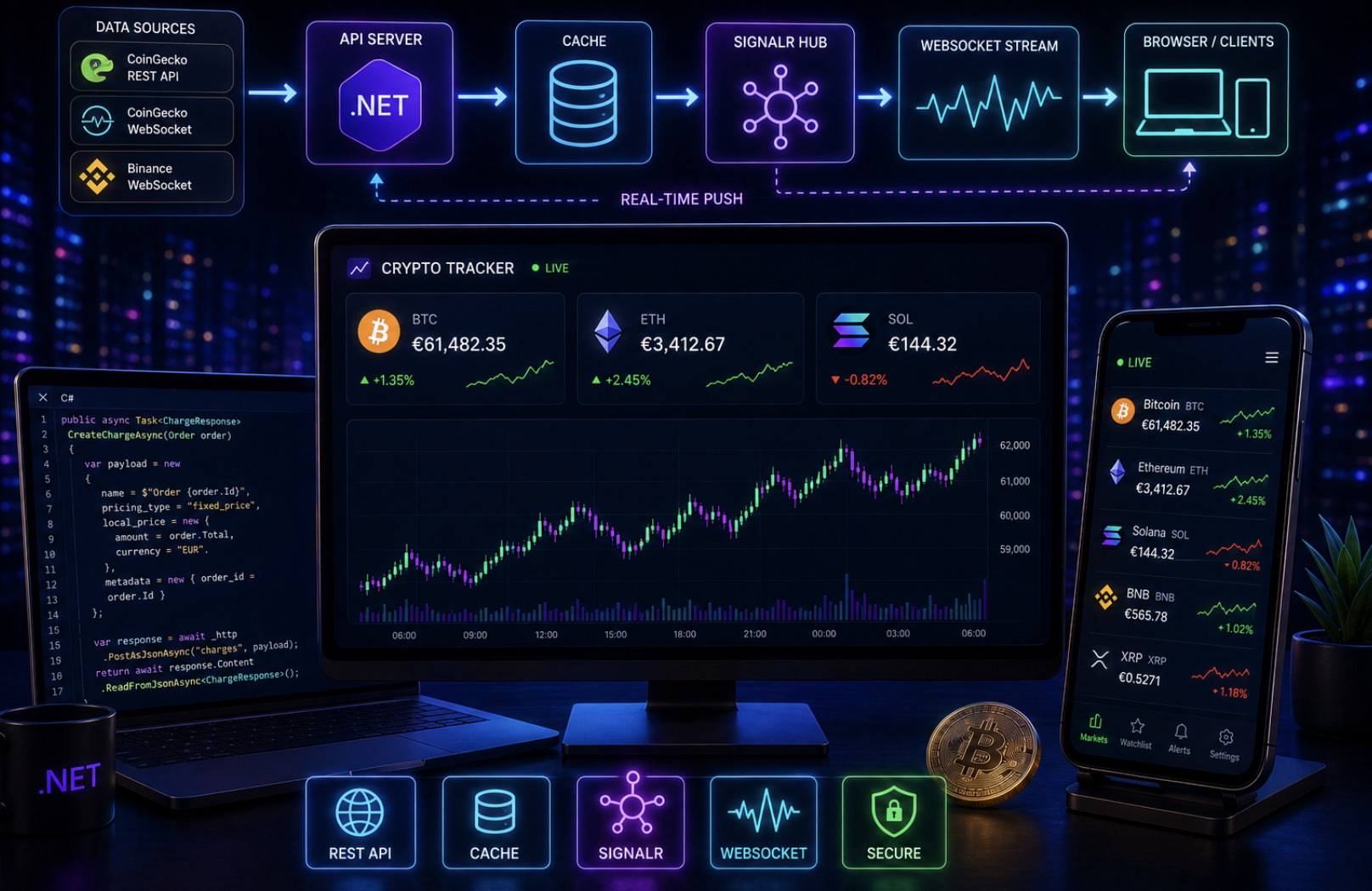
A real-time crypto price tracker is one of the best projects for learning modern web data flows. It touches everything: external APIs, polling versus streaming, AJAX updates, WebSockets, server push, caching, and rate limits. This guide shows how to build a crypto price tracker that updates live in the browser, starting from a simple AJAX polling approach and evolving into a low-latency WebSocket and SignalR architecture in ASP.NET Core.
We'll use free and paid data sources that exist today, and the code runs on .NET 9 or .NET 8 with vanilla JavaScript on the front end — no heavy framework required.
Choosing your data source
Your tracker is only as good as its data feed. In 2026 three sources cover almost every use case:
CoinGecko REST API — the
/simple/priceand/coins/marketsendpoints return prices for 17,000+ coins. The Demo plan offers keyless access, which is perfect for polling-based apps and prototypes.CoinGecko WebSocket API — a persistent connection streaming sub-second, tick-level prices. It is available on paid plans (Analyst and above, from around $129/month) and is the cleanest option for true real-time streaming.
Binance WebSocket — free live spot prices, order-book, and trade streams with the lowest latency of the major providers, typically under 50 milliseconds.
The rule of thumb: use REST polling when a few seconds of delay is acceptable and you want the simplest build, and use WebSockets when you need instant, tick-level updates such as a trading dashboard or a live ticker.
Version one — AJAX polling
The simplest working tracker polls a REST endpoint on a timer and patches the DOM. Don't call CoinGecko directly from the browser — that leaks your API key and hits rate limits fast. Instead, proxy through your own ASP.NET Core endpoint, which also lets you cache responses.
csharp
[ApiController]
[Route("api/prices")]
public class PricesController : ControllerBase
{
    private readonly HttpClient _http;
    private readonly IMemoryCache _cache;

    public PricesController(HttpClient http, IMemoryCache cache)
    {
        _http = http;
        _cache = cache;
    }

    [HttpGet]
    public async Task<IActionResult> Get(string ids = "bitcoin,ethereum,solana")
    {
        var data = await _cache.GetOrCreateAsync($"prices:{ids}", async entry =>
        {
            entry.AbsoluteExpirationRelativeToNow = TimeSpan.FromSeconds(15);
            var url = $"https://api.coingecko.com/api/v3/simple/price" +
                      $"?ids={ids}&vs_currencies=eur&include_24hr_change=true";
            return await _http.GetStringAsync(url);
        });
        return Content(data, "application/json");
    }
}
The 15-second cache is the single most important line. It means a thousand visitors still trigger only one upstream call every 15 seconds, keeping you comfortably inside free-tier rate limits. On the client, poll with fetch:
javascript
async function refreshPrices() {
  const res = await fetch('/api/prices?ids=bitcoin,ethereum,solana');
  const data = await res.json();
  for (const [coin, info] of Object.entries(data)) {
    const el = document.getElementById(coin);
    el.querySelector('.price').textContent = `€${info.eur.toLocaleString()}`;
    const change = info.eur_24h_change;
    el.querySelector('.change').textContent = `${change.toFixed(2)}%`;
    el.classList.toggle('up', change >= 0);
    el.classList.toggle('down', change < 0);
  }
}

setInterval(refreshPrices, 15000);
refreshPrices();
This is a complete, production-usable tracker for many sites. It is easy to reason about, degrades gracefully, and requires no persistent connections. Its only limit is latency — you see prices at your polling interval, not the instant they change.
Version two — WebSocket streaming for true real-time
When you need a live ticker that reacts the moment a trade happens, switch from polling to a WebSocket stream. Unlike REST, a WebSocket pushes updates to your application as soon as new data is available, eliminating wasted polling requests.
You could open a Binance WebSocket directly from the browser for a read-only public feed, but the more robust and scalable pattern is to connect once from your server and fan the data out to all clients. That avoids every visitor holding their own upstream socket, centralizes reconnection logic, and lets you normalize the payload before it reaches the browser. In ASP.NET Core, the natural tool for the server-to-browser leg is SignalR.
Fanning out with SignalR
A background service connects to the exchange WebSocket, parses each tick, and broadcasts it to browsers through a SignalR hub. Browsers never talk to Binance directly — they subscribe to your hub.
csharp
public class PriceHub : Hub { }

public class BinanceStreamService : BackgroundService
{
    private readonly IHubContext<PriceHub> _hub;

    public BinanceStreamService(IHubContext<PriceHub> hub) => _hub = hub;

    protected override async Task ExecuteAsync(CancellationToken ct)
    {
        using var socket = new ClientWebSocket();
        await socket.ConnectAsync(
            new Uri("wss://stream.binance.com:9443/ws/btcusdt@trade"), ct);

        var buffer = new byte[8192];
        while (!ct.IsCancellationRequested)
        {
            var result = await socket.ReceiveAsync(buffer, ct);
            var json = Encoding.UTF8.GetString(buffer, 0, result.Count);
            using var doc = JsonDocument.Parse(json);
            var price = doc.RootElement.GetProperty("p").GetString();
            await _hub.Clients.All.SendAsync("priceUpdate", "BTCUSDT", price, ct);
        }
    }
}
Register the hub and the background service in Program.cs:
csharp
builder.Services.AddSignalR();
builder.Services.AddHostedService<BinanceStreamService>();
// ...
app.MapHub<PriceHub>("/hubs/price");
On the client, subscribe with the SignalR JavaScript client and update the DOM on every tick — no timer needed:
javascript
const connection = new signalR.HubConnectionBuilder()
  .withUrl('/hubs/price')
  .withAutomaticReconnect()
  .build();

connection.on('priceUpdate', (symbol, price) => {
  document.getElementById(symbol).querySelector('.price').textContent =
    `$${Number(price).toLocaleString()}`;
});

connection.start();
Now every browser sees the price change within milliseconds of it happening on the exchange, and your server maintains just one upstream connection regardless of how many visitors are watching.
Resilience — the part beginners skip
Real-time systems fail in real time, so plan for it. WebSocket connections drop; wrap the exchange connection in a reconnect loop with exponential backoff, and use SignalR's withAutomaticReconnect() on the client so browsers recover on their own. Respect rate limits even on WebSockets by subscribing only to the streams you actually display. Handle bad data defensively — a missing field or a malformed frame should be logged and skipped, never allowed to crash the background service.
Throttle UI updates too. A high-volume pair like BTC can emit many ticks per second, which will thrash the DOM. Batch updates with requestAnimationFrame or coalesce them to a few renders per second so the page stays smooth. Finally, show connection state to the user — a small "live / reconnecting" indicator builds trust and makes debugging easier.
Adding depth — charts, search, and multiple currencies
A live number is a good start, but a real crypto price tracker earns repeat visits by doing more. The same architecture extends cleanly in three directions.
Historical charts turn a ticker into a tool. CoinGecko's /coins/{id}/market_chart endpoint returns price history over any range, which you can feed into a lightweight charting library such as Chart.js. Because this data changes slowly, cache it aggressively on the server — a five-minute cache on hourly candles is plenty and keeps you far inside rate limits. Render the chart once on page load and let the WebSocket feed animate only the latest point.
Coin search and watchlists make the tracker personal. Pull the full coin list from CoinGecko once, cache it for a day, and let users filter client-side so every keystroke doesn't hit the API. Persist a visitor's chosen coins in localStorage so their watchlist survives a refresh without any backend account system. This is a fast win that dramatically increases time on page.
Multiple fiat currencies widen your audience. The vs_currencies parameter accepts euro, dollar, pound, and dozens more in a single request, so you can offer a currency switch without extra API calls. Detect the visitor's likely currency from their locale and default to it, but always let them override.
Each of these features reuses the caching, proxying, and DOM-update foundations you already built. That is the payoff of a clean architecture: new capabilities bolt on rather than forcing a rewrite.
Which version should you build
Start with AJAX polling. It solves the problem for most sites — a homepage ticker, a portfolio widget, a market overview — with the least moving parts and the smallest failure surface. Reach for the WebSocket-plus-SignalR architecture only when milliseconds genuinely matter, such as a trading interface or a live price alert system. The elegant part is that both versions share the same front-end DOM-update code, so upgrading from polling to streaming later is mostly a data-transport swap, not a rewrite.
A real-time crypto price tracker is a small app that teaches big lessons: cache aggressively, keep secrets on the server, prefer streaming only when you need it, and always design for the connection dropping. Get those right and you have a fast, reliable tracker that scales from a hobby widget to a production dashboard.
This article is technical guidance for developers. Cryptocurrency prices are highly volatile; nothing here is investment advice.